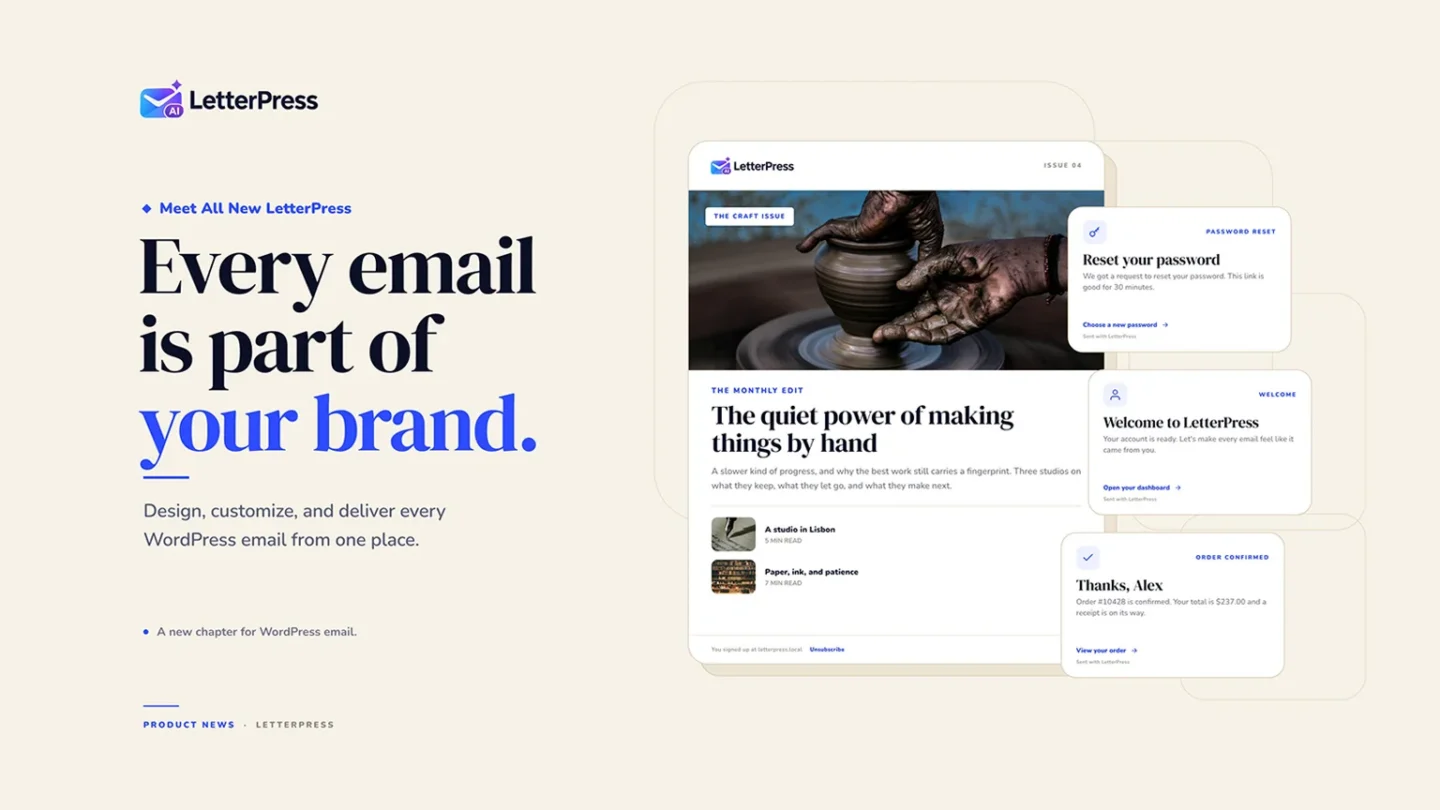
Create, Design, and Manage Every Email with LetterPress AI.
Every WordPress site sends email. Password resets at midnight. Order confirmations. Form replies. The weekly newsletter you spent an hour designing.
Most of those emails look like they came from a different website. Sometimes they look like they came from a different decade.
LetterPress and LetterPress Pro are out today. Together they replace the stack of plugins most sites use for email design, email marketing, and delivery. The regular version handles the essentials. Pro adds AI, a larger template library, and support for the plugins that send your most important mail.
Here is what is inside.
Design emails without touching HTML
The visual builder is the center of LetterPress. You work with rows, columns, and content blocks, then style them with normal controls for type, color, spacing, borders, and backgrounds.
- Start from a blank canvas or a ready-made design.
- Preview on desktop and mobile before you send.
- Personalize with dynamic variables like names and site details.
- Save, duplicate, and reuse templates.
- Edit individual blocks without writing a line of HTML, CSS, or PHP.
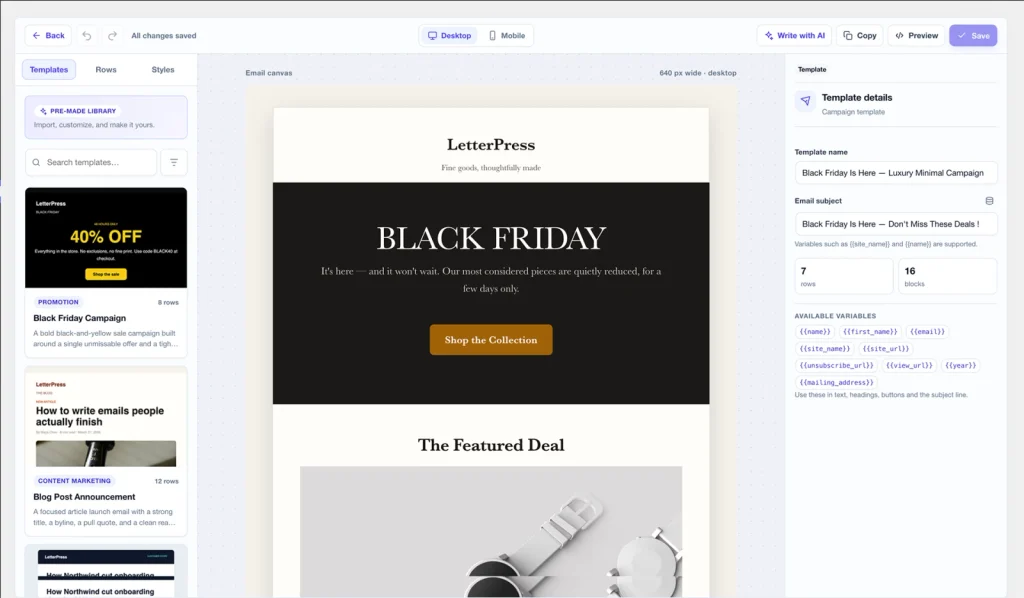
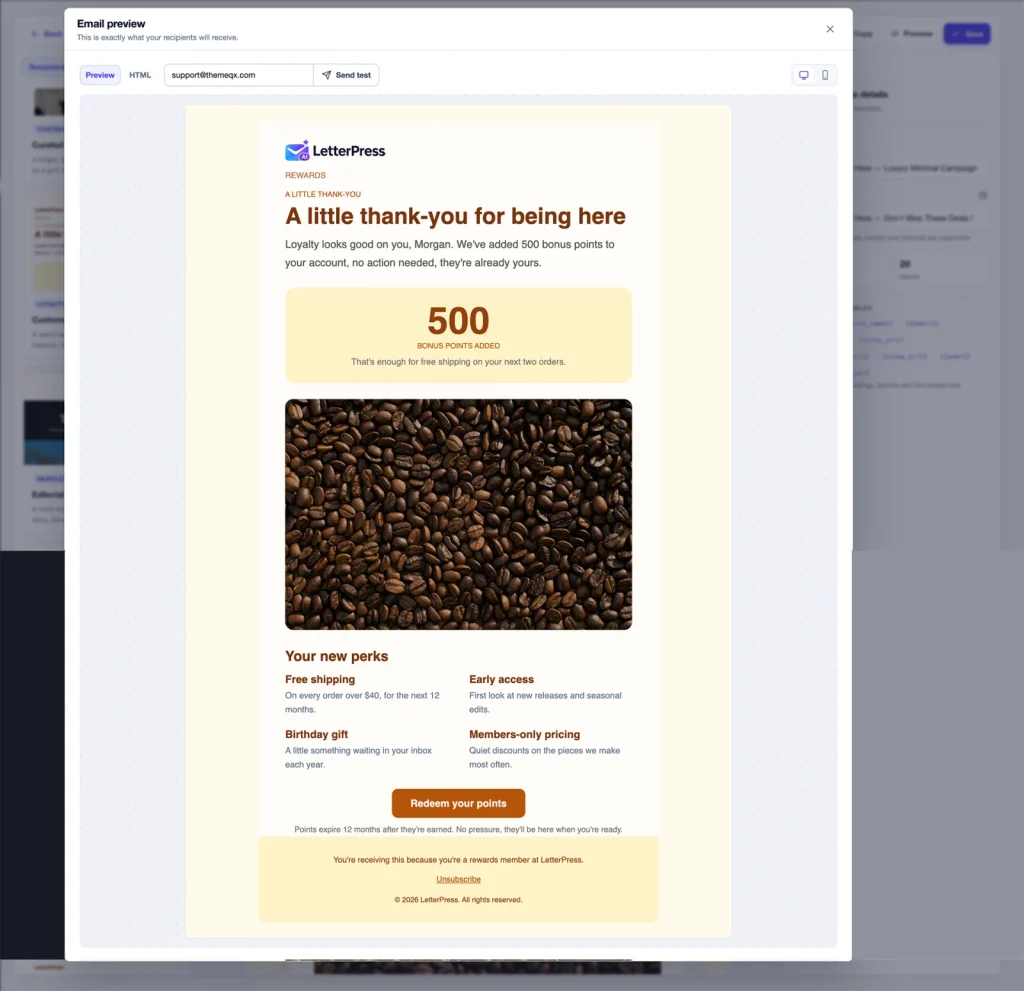
The regular version includes six starter templates. Pro adds 50 more across a dozen categories.
Your WordPress notifications, finally on brand
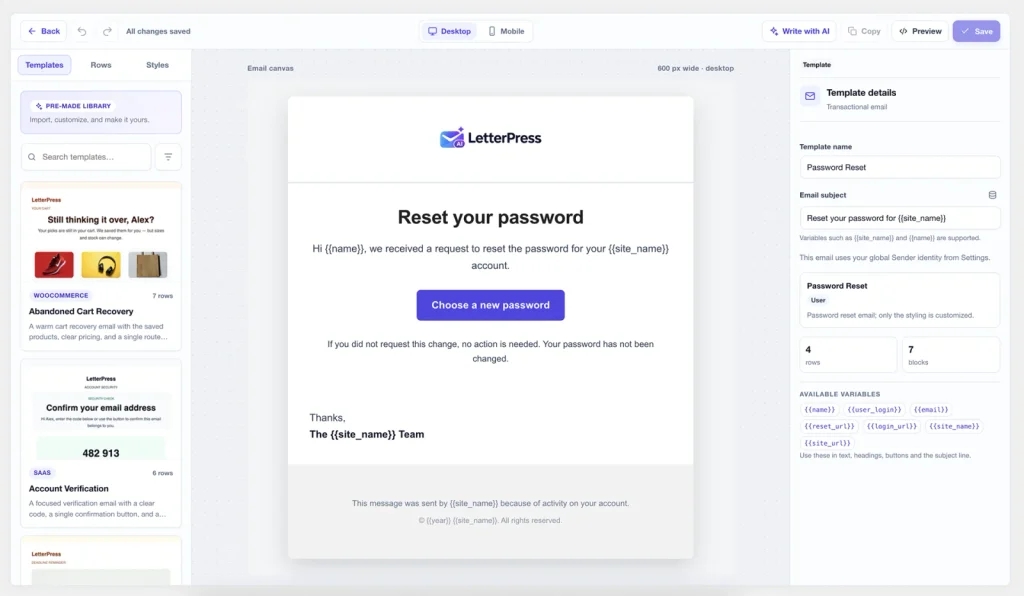
WordPress website sends more email than most people realize. Registration confirmations, password resets, comment notices, account changes. LetterPress lets you take those over with the same builder.
You do not need Pro for this. The regular plugin covers the core WordPress emails. Pro extends the same idea to the plugins your site already depends on.
Newsletters and campaigns without another subscription
LetterPress brings email marketing into your own website admin area. You can build a campaign, pick an audience, send a test, and schedule the real thing.
Subscriber management is included too.
- Groups for segmentation.
- Sources for different websites, forms, or brands.
- Personalization with subscriber details
- Double opt-in for cleaner lists.
- CSV import and export, plus a WordPress user import.
- Personalized unsubscribe links and List-Unsubscribe headers.
- Lists of addresses that should never receive campaigns, so unsubscribed and blocked addresses stay out of future campaigns.
Each source can have its own sender name, sender address, reply-to address, and confirmation email. If you run several brands from one WordPress install, they can share the dashboard without sharing an identity.
A REST API for the rest of your stack
If you collect subscribers somewhere other than WordPress, the built-in REST API can help. Create an API key, add subscribers from another app, pull a paginated list, and filter by source. Keys are stored as hashes and shown in full only once, so keep that copy safe.
Delivery that does not depend on wp_mail() alone
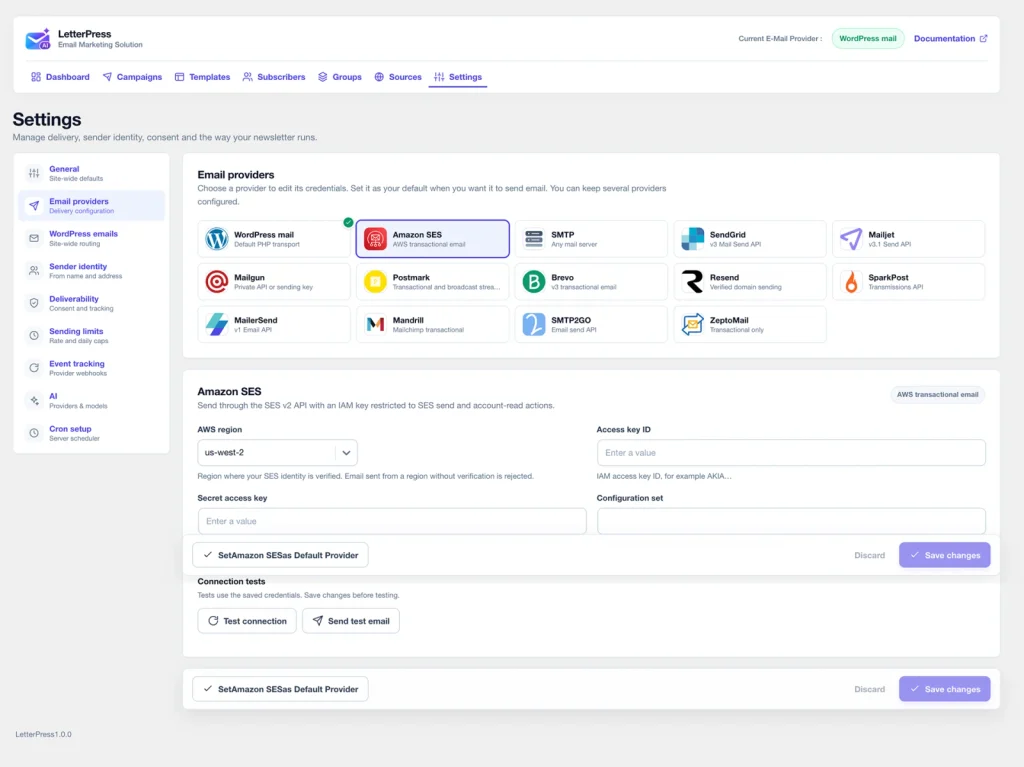
LetterPress connects to 12 delivery services, plus generic SMTP and standard WordPress mail. The list includes Amazon SES, SendGrid, Mailjet, Mailgun, Postmark, Brevo, Resend, SparkPost, MailerSend, Mandrill, SMTP2GO, and Zoho ZeptoMail.
You can use LetterPress purely as an SMTP plugin. Campaigns are optional. The plugin encrypts stored credentials, tests provider connections, and sends through whichever provider you select. Other saved providers stay in place in case you switch later.
Campaigns include a reliable sending queue, customizable sending limits, and protection against sending the same email twice. Amazon SES users also get quota reporting and delivery, bounce, complaint, and rejection events through SNS.
On cost, Amazon SES charges about $0.10 per 1,000 outbound emails. That is a different world from typical SaaS newsletter pricing. Real costs depend on your provider, region, plan, and usage.
LetterPress Pro: AI, templates, and integrations
LetterPress Pro takes everything further. It adds AI-powered email creation, an expanded template library, and integrations with popular WordPress plugins, bringing even more of your website’s emails under one roof.
Describe the email and let AI draft it
Open a template, click Write with AI, and describe the campaign. You get a complete, styled email in the builder, not a block of pasted HTML.
Pro supports OpenAI, OpenAI-compatible endpoints, Anthropic Claude, Google Gemini, and OpenRouter. Keys stay on your server and are never sent to the browser. You can also see which AI model was used, along with token usage and estimated costs.
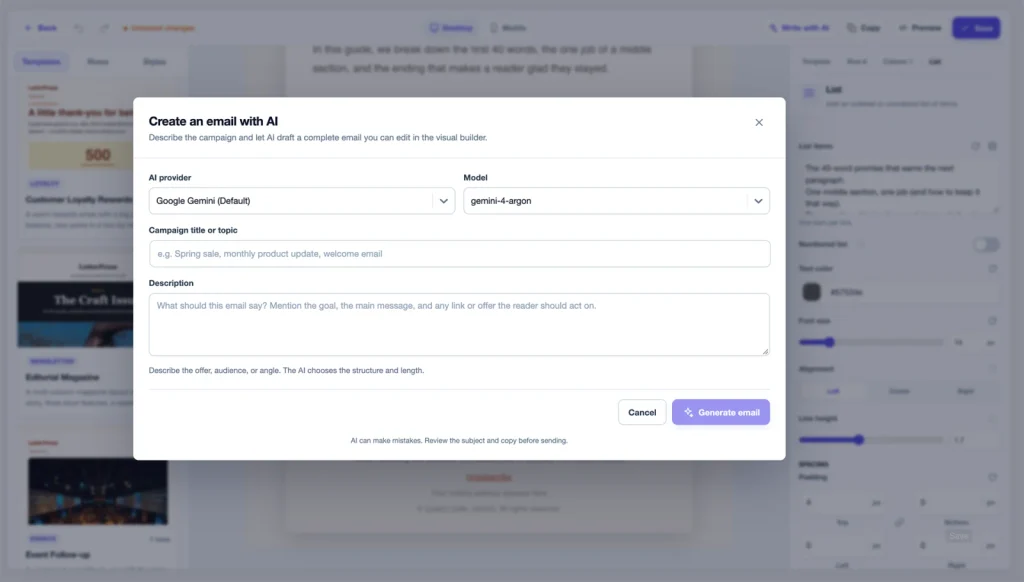
The result is validated before it reaches the canvas. If the model returns a broken structure, the validator repairs it. If the request fails, you see the error and can retry. AI can still make mistakes, so review the copy before you hit send.
Start with a design instead of a blank page
The Pro library covers SaaS, WooCommerce, education, events, membership, business, product updates, newsletters, content marketing, promotions, loyalty, and celebrations. Every template is a normal LetterPress document with styled rows, real copy structure.
Import one, swap the logo and photos, rewrite the text, and make it yours. The original stays untouched, so you can import it again for another campaign.
Brand the email from your other plugins
This is the part that matters most for stores, course creators, and membership sites. Pro connects to 13 plugins and brings their notifications into the same builder.
- eCommerce: WooCommerce with 27 events, Easy Digital Downloads with 10.
- Learning: LearnDash with 21 events, Tutor LMS with 6.
- Memberships: MemberPress with 36 events, Paid Memberships Pro with 23.
- Forms: Contact Form 7, WPForms, Gravity Forms, Fluent Forms, and the Divi contact form.
- Bookings: Amelia with 45 events, Bookly with 3.
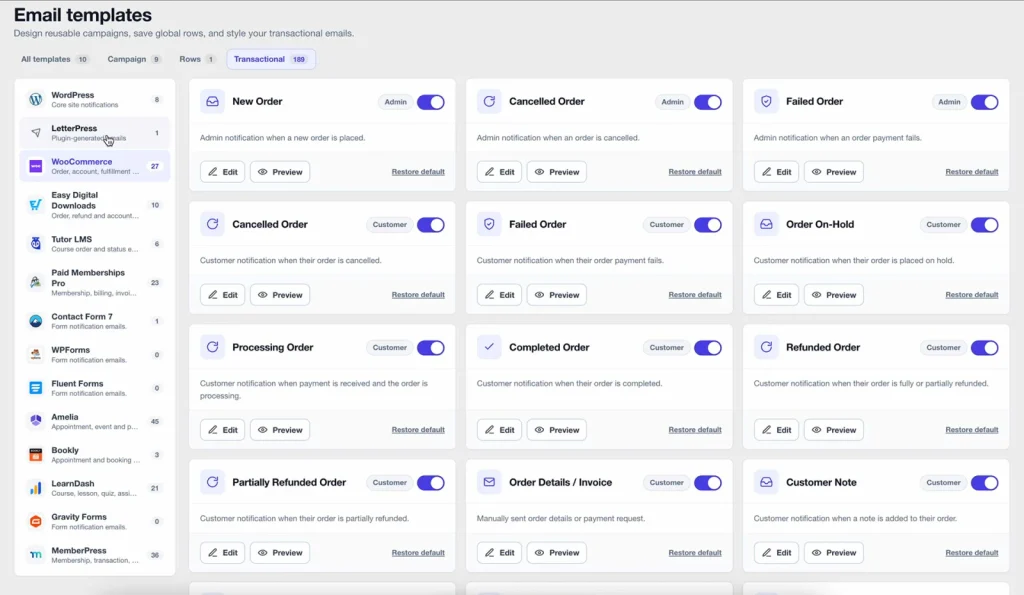
That covers order confirmations, shipping updates, course enrollment, lesson reminders, membership renewals, form replies, booking confirmations, and more. Each integration turns on only when its plugin is installed and active.
Who this is for
LetterPress fits a few kinds of sites especially well.
- Stores that want every order and shipping email to match the shop.
- Course creators and membership sites with a long list of automated notifications.
- Agencies managing email for several client sites from one dashboard.
- Publishers and small teams that want a newsletter without another monthly bill.
- Developers who want a REST API for subscribers and a builder that non-technical editors can use.
Black Friday Lifetime Deal
We’re celebrating the launch of LetterPress Pro with a special Black Friday Lifetime Deal!
For a limited time, get lifetime access to LetterPress Pro at a special launch price. Pay once, enjoy all current Pro features and future Pro features, with no recurring subscriptions or annual renewals.
Save up to $210 with our Black Friday launch offer.
Every purchase includes a 14-day money-back guarantee, so you can try LetterPress Pro on your own website with confidence.
Celebrate our launch and grab your lifetime deal while the Black Friday offer lasts!
Get started
- Install LetterPress from the WordPress plugin directory.
- Connect a delivery provider under Settings.
- Set your sender name and address.
- Build a template or import one.
- Add a signup form using the shortcode.
- Set up the cron URL on the Cron Setup screen so campaigns process on time.
LetterPress needs WordPress 6.5 or newer and PHP 7.4 or newer. Pro requires the regular version.
The free plugin is on WordPress.org. Pro, pricing, and the launch offer are on themeqx.com. The full documentation is at docs.briskfoundry.com/letterpress.
If you have been sending plain emails because customizing them felt like too much work, this release is for you. Your site already has a voice. Your email should sound and look like it.