
If your email list has outgrown your current plugin, the hard part is rarely the software. It is the move. Will your contacts survive? Will unsubscribes stay unsubscribed? Will your tags and custom fields arrive intact?
LetterPress 1.0.6 is built around that worry. It adds a migration tool for four popular WordPress email plugins, improves CSV import, and makes the admin faster for very large audiences. If you are looking for a MailPoet or FluentCRM alternative, or a simpler path away from The Newsletter Plugin or Icegram Express, this release gives you a safer way to switch.
Move your audience in one run
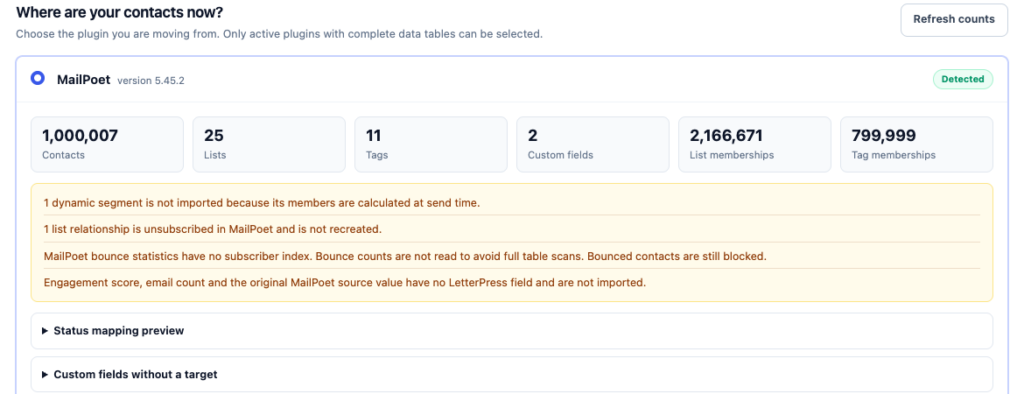
The new Migrate screen reads data directly from the plugin you are leaving. Supported sources today are MailPoet, FluentCRM, The Newsletter Plugin, and Icegram Express.
Keep the old plugin active, open LetterPress > Migrate, pick the source, and review the counts. Then choose how existing contacts should be handled and click Start migration.
- Contacts and names become subscribers.
- Statuses stay matched, including subscribed, pending, unsubscribed, bounced, and complained.
- Lists become groups. Tags become groups named Tag: tag name.
- Matching custom fields come across.
- Unsubscribes, bounces, complaints, and blocked addresses stay suppressed.
The import runs in batches. You can pause it, close the tab, and come back later. You can also cancel a run, retry failed records, and run the import again without creating duplicates. A final verification pass checks contact counts, status mapping, memberships, and suppression safety.
No emails are sent during the import. An address that unsubscribed, bounced, or complained will not become subscribed again.
A quick look at each source
- MailPoet: Contacts, lists, tags, and custom fields move across. Dynamic segments are not imported because their members are calculated at send time.
- FluentCRM: Lists become groups, tags become groups named Tag: tag name, and custom fields move. Contacts that left a list stay out of that list.
- The Newsletter Plugin: Lists and profile fields come across. The core Newsletter plugin does not provide tags, so no tag groups are created.
- Icegram Express: Contacts, lists, custom fields, unsubscribes, hard bounces, spam complaints, and blocked addresses move across.
CSV import that understands Mailchimp exports
The importer now recognizes common headers such as Email Address, Email, Name, First Name, and Last Name. It skips suppressed rows, so unsubscribed and blocked addresses do not slip back in.
Mailchimp exports work too. You can import the subscribed file and keep the unsubscribed and cleaned contacts out of your active list. Tags and groups are not created from a CSV. Create the groups you need, then filter by the import source and add contacts in bulk.
The upload limit is 10 MB. For a larger audience, split the export into smaller files and import them one at a time.
Tested with more than a million subscribers
A big list should not make the admin feel slow. This release reworked large-audience queries and counts, added targeted caching, and improved indexed search.
The test install held 1,012,512 subscribers and 2,704,338 group memberships on a deliberately low-spec server.
- The full subscribers page loaded in 1.15 seconds cold and 0.35 seconds warm.
- An exact email search among a million contacts took about 130 ms.
- Page 5,000, which is 250,000 rows deep, opened in about 314 ms.
- Filtering a 900,000-member group took about 945 ms.
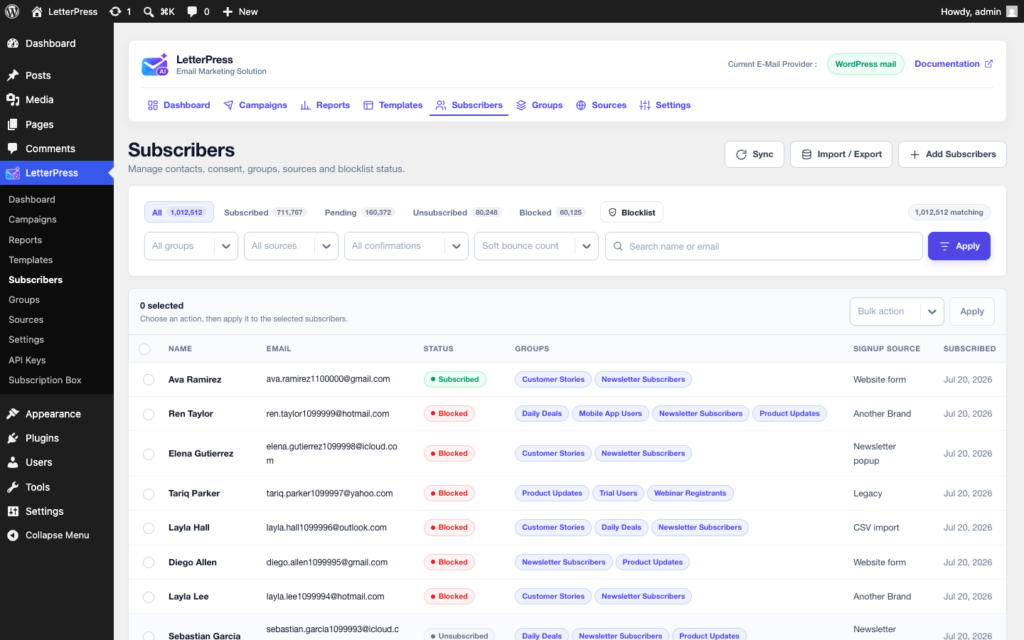
The new Built for Scale page shares the full test setup, query counts, and a recorded one-million-subscriber walkthrough. It is proof, not a promise.
A signup block for the block editor
LetterPress now includes a native Subscription Box block. Add it to any post or page, choose an active source, and edit the copy and styles in the editor. The preview matches the published form.
The block uses the same consent checkbox, honeypot, rate limits, AJAX submission, and source tracking as the shortcode. The shortcode is still there for the classic editor, widgets, and theme templates.
You asked, we delivered: FluentCart and more Pro integrations
FluentCart has been one of the most requested integrations, and LetterPress Pro now covers it. You get 40 FluentCart email templates for orders, subscriptions, renewals, reminders, shipping, and reviews. That is 38 core events plus 2 from FluentCart Pro.
FluentCart joins more than 200 built-in event definitions across 14 Pro integrations, including WooCommerce, Easy Digital Downloads, Paid Memberships Pro, MemberPress, LearnDash, Tutor LMS, Contact Form 7, Gravity Forms, WPForms, Fluent Forms, Amelia, Bookly, and Divi.
We listen to user requests, and this list keeps growing. If a plugin sends email your customers depend on, tell us. It may be the next integration we build.
What else changed in recent releases
Version 1.0.6 also refactors the plugin into a modular app structure and moves its tables to the lpe_ prefix. Existing data is migrated automatically when you update.
The releases before it set the stage:
- 1.0.5: Campaigns are now created and edited entirely in the visual builder, including sender identity, recipients, subject, and design. Saved templates can be imported alongside the ready-made library.
- 1.0.4: Sent and cancelled campaigns are locked from editing. Two new blocks, Pricing and Pricing Table, make it easier to build offer emails.
- 1.0.3: Add Subscribers modal, Retry and Cancel actions, a Prune event data setting, and one live failure count that matches between campaign cards and reports.
- 1.0.2: A full Reports area with campaign, audience, deliverability, and event views. Local click and open tracking, faster report tables, a Clean Up Queue action, and a soft bounce filter for subscribers.
How to switch without losing sleep
- Back up your site.
- Keep the old plugin active. LetterPress reads its data and does not change it.
- Open LetterPress > Migrate and select the source.
- Review the counts and choose Merge safely.
- Start the migration. Pause it if you need to.
- Check the verification report, then open Subscribers, Groups, and Blocklist.
- Send a test campaign to yourself.
- Keep the old plugin inactive for a few days. Delete its data only after you are confident.
The full migration guide covers each plugin, what moves across, and what is skipped. Read it before you start so there are no surprises.
LetterPress 1.0.6 is available now. Update from your WordPress dashboard or download it from WordPress.org. If you have been putting off a move because the export looked risky, this release is the reason to take another look.
Need AI email creation, a larger template library, or integrations with WooCommerce and other plugins? LetterPress Pro adds those on top of the same core plugin.